
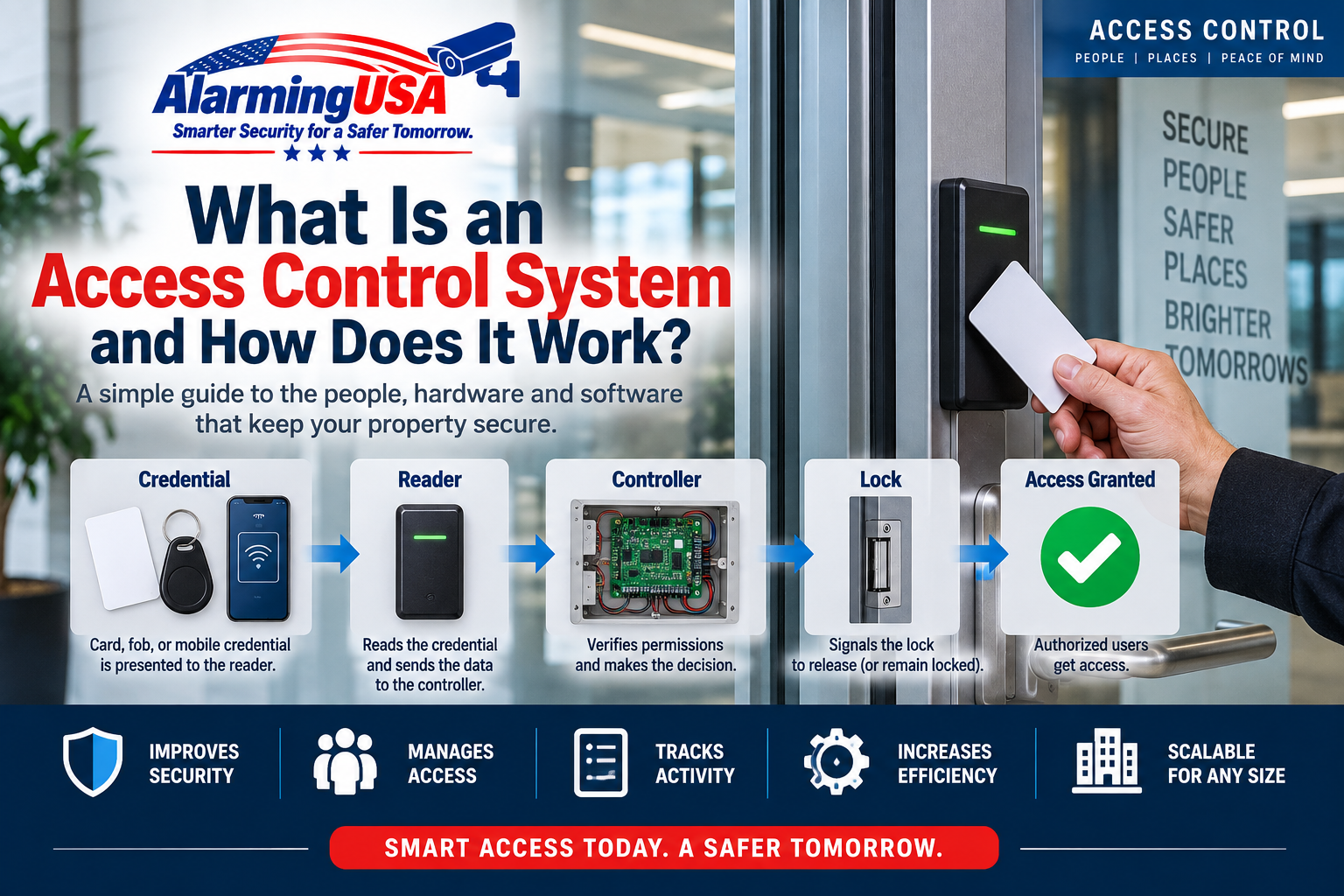
An access control system manages who can enter a secured door, gate, or other controlled area. Instead of relying only on a traditional mechanical key, access control can use cards, key fobs, mobile credentials, PINs, or other authentication methods to decide whether a person should be allowed through an opening.
For businesses, schools, offices, apartment buildings, and other facilities, the biggest advantage is control. Credentials can be added or removed without rekeying every door, access can be limited by time or location, and the system can maintain a history of access activity.
What Is an Access Control System?
An electronic access control system is a combination of credentials, readers, controllers, locking hardware, door-status devices, power supplies, software, and network components. These parts work together to identify a credential, determine whether access should be granted, unlock the door when authorized, and monitor what happens afterward.
Systems range from a single standalone keypad controlling one door to enterprise platforms managing thousands of doors across multiple buildings.
How Does Access Control Work?
A typical card-access transaction happens in a few seconds:
- A person presents a credential. This might be a card, key fob, mobile credential, PIN, or another supported credential.
- The reader reads the credential. The reader captures the credential information and sends it to the access control system.
- The system evaluates access rights. The controller or access control platform determines whether that credential is authorized at that particular door and time.
- Access is granted or denied. If authorized, the system activates the locking hardware for a programmed period. If not authorized, the door remains secured.
- The event is recorded. The system can create an event showing the credential, door, date, time, and result of the transaction.
The Main Parts of an Access Control System
Credentials
A credential identifies a user to the system. Common examples include proximity cards, smart cards, key fobs, mobile credentials, and PIN codes. Some systems can also use biometric authentication.
The credential itself does not necessarily mean a person can open every controlled door. The access control system determines which doors and schedules are assigned to that credential.
Card Readers and Credential Readers
The reader is installed near the controlled entrance. When a credential is presented, the reader communicates credential information to the system.
Reader technology varies considerably. Older systems may use traditional proximity technology, while newer systems can support smart cards, encrypted credentials, and mobile devices.
Access Control Panel or Controller
The controller is one of the most important parts of the system. It receives information associated with the credential transaction and makes or facilitates the access decision based on programmed permissions.
Many controllers can continue making local access decisions even if communication with the main server is temporarily interrupted, although exact offline capabilities depend on the manufacturer and configuration.
Electronic Locking Hardware
The system needs a way to electrically release or secure the opening. Common hardware includes:
- Electric strikes
- Electromagnetic locks
- Electrified mortise locks
- Electrified panic hardware
- Electric latch retraction devices
The correct hardware depends on the door, frame, building and fire codes, egress requirements, and the way the opening is intended to operate.
Door Position Switch
A door position switch tells the access control system whether a door is physically open or closed. This allows the system to identify conditions such as a door being held open too long or opening without a valid access transaction.
Request-to-Exit Device
A request-to-exit device, often called a REX, can tell the system that someone is legitimately leaving through a controlled opening. Depending on the door and locking arrangement, a REX may also be part of the unlocking or monitoring sequence.
Exit arrangements must comply with applicable life-safety and building-code requirements. Access control should never be designed in a way that improperly restricts required emergency egress.
Power Supply
Readers, controllers, locking devices, and other components require electrical power. Some systems use dedicated access control power supplies with battery backup so equipment can continue operating for a period during a utility outage.
How a door behaves when power fails depends on the locking hardware, system design, and applicable code requirements.
Access Control Software
The software provides the administrative interface for managing people, credentials, doors, schedules, permissions, alarms, and reports.
Administrators may use it to issue a new credential, immediately disable a lost card, change a person’s access rights, review activity, or investigate a door alarm.
What Is an Access Level?
An access level is a set of permissions defining where and often when a person is allowed access. For example, an employee might have access to the main entrance and office areas Monday through Friday during normal business hours, while another employee may require 24-hour access to additional areas.
This is one of the major differences between electronic access control and mechanical keys: permissions can be changed through the system without physically replacing locks or collecting every copy of a key.
What Happens When a Card Is Lost?
With a traditional key, a lost key may require rekeying a lock if unauthorized use is a concern. With electronic access control, an administrator can generally disable the lost credential and issue a replacement.
This does not automatically solve every security problem, but it gives administrators much more control over credential management.
Door Forced Open vs. Door Held Open
Two common access control conditions are door forced open and door held open.
Door forced open generally means the system detected the door opening without the expected authorized access or exit sequence.
Door held open generally means an authorized opening occurred, but the door remained open longer than the programmed time.
The exact terminology and logic can vary by manufacturer, but both conditions can help identify doors that are not operating as expected.
Access Control vs. Traditional Keys
Mechanical keys remain appropriate for many applications, but electronic access control offers capabilities that keys alone cannot easily provide.
| Feature | Traditional Keys | Electronic Access Control |
|---|---|---|
| Remove one user’s access | May require recovering key or rekeying | Credential can generally be disabled |
| Restrict access by schedule | Not normally | Yes |
| Different permissions by door | Requires keying strategy | Programmable |
| Access history | No | Typically available |
| Remote administration | No | Available on many systems |
| Lost credential replacement | Potential rekeying | Disable and replace credential |
On-Premises vs. Cloud-Based Access Control
Traditional access control systems commonly use local servers and software at the facility or within the organization’s network. Cloud-managed systems may provide administration through a web-based platform and can reduce the amount of local server infrastructure required.
Neither architecture is automatically appropriate for every installation. Organizations should consider cybersecurity requirements, network reliability, integrations, recurring costs, IT policies, offline operation, system size, and administrative needs.
Can Access Control Work Without the Internet?
Many access control systems do not require a continuous public internet connection for every door transaction. A properly configured local controller may retain credential and permission information and continue processing access decisions during certain communication interruptions.
However, cloud-managed features, remote administration, notifications, integrations, and other functions may be affected when connectivity is unavailable. Offline behavior should always be verified for the specific system being considered.
What Happens During a Power Outage?
A power failure does not produce the same result on every access control system. Battery-backed power supplies may keep controllers and locking equipment operating temporarily. Some locks are designed to unlock when power is removed, while others remain locked from the secure side while still allowing required egress.
Because locking hardware interacts with life-safety requirements, power-failure behavior should be designed around the specific opening and applicable codes rather than treated as a universal setting.
Who Uses Access Control?
Electronic access control is used in many types of facilities, including:
- Office buildings
- Schools and universities
- Hospitals and healthcare facilities
- Warehouses
- Apartment and condominium buildings
- Government facilities
- Retail and commercial properties
- Data centers and technology facilities
- Parking garages and controlled gates
What Should You Consider Before Installing Access Control?
Before selecting equipment, identify what the system actually needs to accomplish. Important questions include:
- How many doors need to be controlled?
- How many users will need credentials?
- Do different users require different schedules?
- What locking hardware is already installed?
- Are the doors fire-rated or part of required egress paths?
- Is battery backup required?
- Will the system integrate with video, intrusion detection, intercoms, elevators, or other systems?
- Who will administer credentials and permissions?
- Does the organization prefer local or cloud-based management?
- What cybersecurity and network requirements apply?
Why Access Control Is More Than a Card Reader
The reader on the wall is only the visible part of a much larger system. Behind it may be a controller, locking hardware, door position monitoring, request-to-exit devices, power supplies, batteries, network connections, databases, servers or cloud services, and administrative software.
Understanding those components makes it much easier to troubleshoot problems and evaluate different access control products.
Final Thoughts
An access control system provides a flexible way to manage who can enter controlled areas and when they can enter. Instead of depending entirely on mechanical keys, organizations can issue electronic credentials, define access permissions, monitor doors, and maintain a record of system activity.
In upcoming AlarmingUSA access control guides, we’ll take a closer look at individual components and concepts, including key cards vs. key fobs vs. mobile credentials, electric strikes vs. magnetic locks, request-to-exit devices, door forced and held-open alarms, backup power, and cloud-based access control.
ALARMING USA COMMUNITY
Discussion 0
Share your experience, ask a question, or reply to another member.
No comments yet. Be the first to start the discussion.